
Endpoint and threat monitoring
Identify which workstations, servers, imaging systems, and user accounts are monitored, who reviews alerts, and how containment decisions are made.
Ransom demands are only one part of a cyber incident. For dental practices, interrupted chair time, recovery work, vendor exposure, and privacy questions can all affect operations.
Schedule a free IT analysis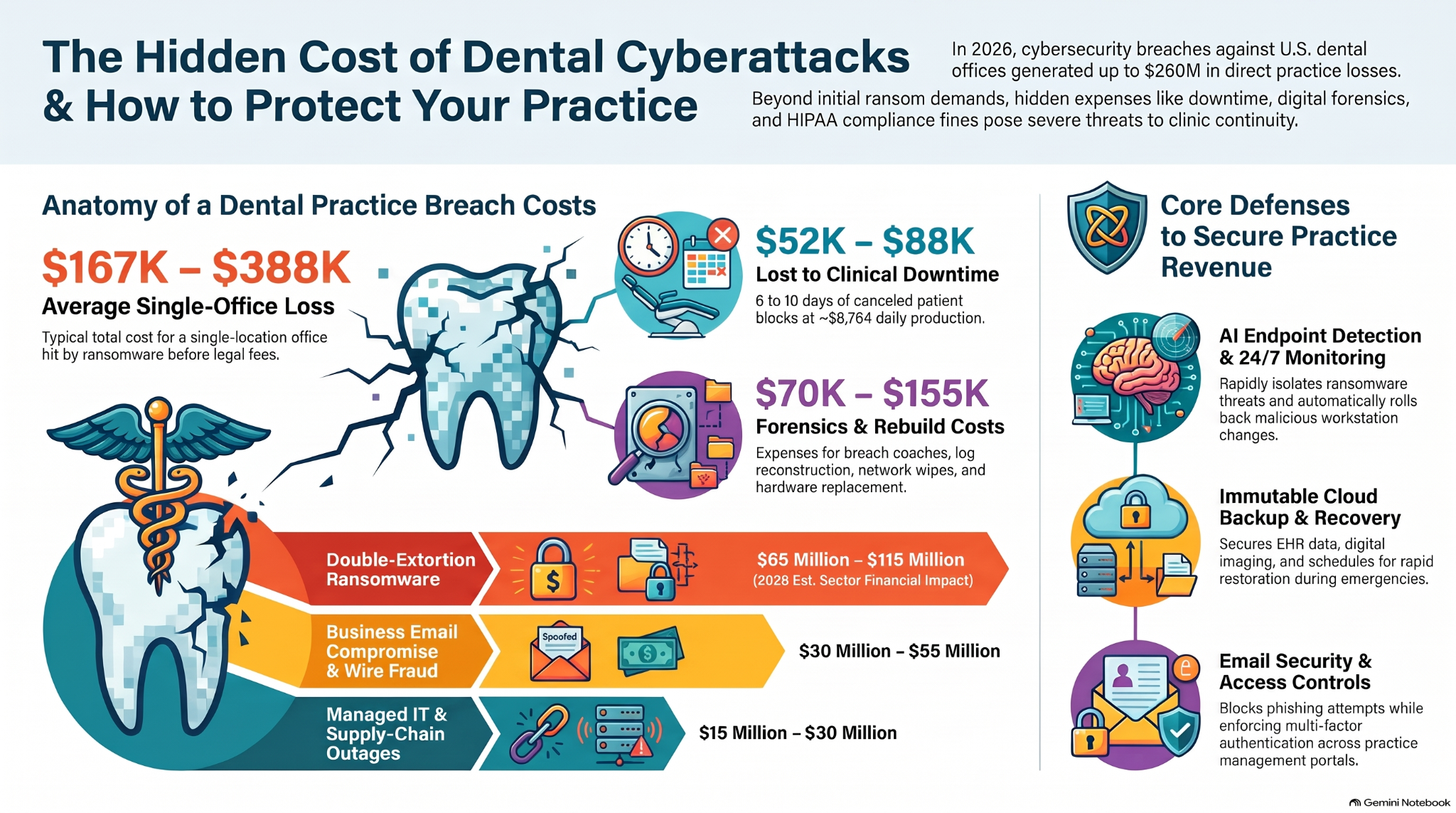
A guide for dental practice owners
Dental offices rely on practice-management systems, digital imaging, email, billing services, and vendor access. A disruption can affect patient scheduling and clinical work even when a practice declines to pay a ransom. This article summarizes the supplied 2026 source document. Its figures are estimates, can vary by incident, and should be checked against current authoritative reporting before being used for financial or compliance decisions.
A visual walkthrough of common incident costs and safeguards to discuss with your IT team.
Even when a practice refuses a ransom demand, systems may remain unavailable while teams investigate, rebuild, restore records, and confirm that systems are safe to use. The source document describes a broad incident-loss range and estimates lost production during outages. Actual costs depend on practice size, recovery needs, insurance, vendor arrangements, and the length and scope of the event.
Hygiene and procedure schedules can be difficult to recreate after an outage. Payroll, rent, and other expenses may continue while appointments are postponed. Recovery planning should identify which systems are essential to care and how the team will communicate if they are unavailable.
Dental practices depend on software providers, billing and clearinghouse services, equipment vendors, and remote IT tools. A disruption at a shared provider can affect multiple customers. Review which outside parties can access systems or data, how access is approved, and who communicates during an incident.
Keep an inventory of important vendors, service contacts, data flows, and escalation paths. Ask providers about their incident notification process and the steps they expect customers to take. These discussions help clarify responsibilities; they do not eliminate third-party risk.
Email accounts and web tools may contain or handle sensitive information. A compromised mailbox can expose attachments or conversations even when a practice’s servers remain available. Scheduling tools and analytics integrations also deserve review so the practice understands what information is collected and where it may be sent.
Public reporting captures only part of the incident picture, and thresholds or reporting timelines can affect what appears in public sources. A qualified privacy professional can help assess notification duties and current requirements for a specific event.
Restoring files alone may leave the weakness that enabled an incident in place. The source document calls attention to legacy imaging equipment, insufficient network separation, lingering vendor credentials, and backups that are reachable from the same environment as affected systems.
Work with qualified IT and equipment providers to understand what can be patched, segmented, isolated, or replaced. Confirm how privileged accounts are reviewed and how backups are protected and tested. Recovery procedures should be documented and exercised with the people who may need to use them.
Legal and regulatory questions may arise from how information is handled, even when ransomware is not involved. Practices should understand their own obligations and seek qualified legal and privacy guidance for decisions about HIPAA, notification, tracking technologies, and incident response.
A written risk assessment and clear ownership of safeguards can help a practice identify questions to resolve. This article is general information, not legal advice or a compliance determination.
Identify which workstations, servers, imaging systems, and user accounts are monitored, who reviews alerts, and how containment decisions are made.
Map what is backed up, how copies are separated from production systems, who can restore them, and when recovery tests last occurred.
Review multi-factor authentication, staff and vendor permissions, mailbox protections, and the process for removing access when roles change.
List operating systems and applications that need updates, including imaging equipment whose maintenance depends on vendor guidance.
Record who leads technical response, who contacts vendors and insurers, and how staff receive instructions during an outage.
Can the team identify who supports each critical system? Does the practice know how to request a restore and who can authorize it? Have staff reviewed how to report a suspicious message? Are vendor access and website tracking practices documented? If an answer is unclear, add it to the practice’s risk-review list and assign an owner.
Hitec-med can discuss technology safeguards and operational support. Compliance decisions should involve qualified privacy and legal professionals.
Editorial note: Cost ranges and incident examples in the supplied source document are estimates and may not apply to an individual practice. Confirm current facts, requirements, and service scope with qualified professionals and relevant providers.