The Internet Broke 17 Times in 11 Days. Your Dental Practice Is Next. What’s Your Plan?
System outages can affect large organizations and small clinics alike. A practical first-hour plan helps your team respond when practice management, imaging, email, or phones are unavailable.
It is Monday at 7:40 a.m. The schedule is full, the clinical team is preparing, and the front desk cannot open the practice-management system. Imaging, email, or phone service may be affected too. The first hour will be easier to manage when your team already knows who to call, what to check, and how to communicate with patients.
The supplied source article describes a cluster of widely reported service disruptions in November 2026 and counts 17 outages across 11 days. The incidents had differing reported causes. A service outage by itself does not establish a cyberattack or a common cause. The article uses the cluster to prompt a practice-level continuity review.
Watch: The 7:40 A.M. outage scenario
Use the video to start a discussion about dependencies, recovery priorities, and the first hour of an interruption.
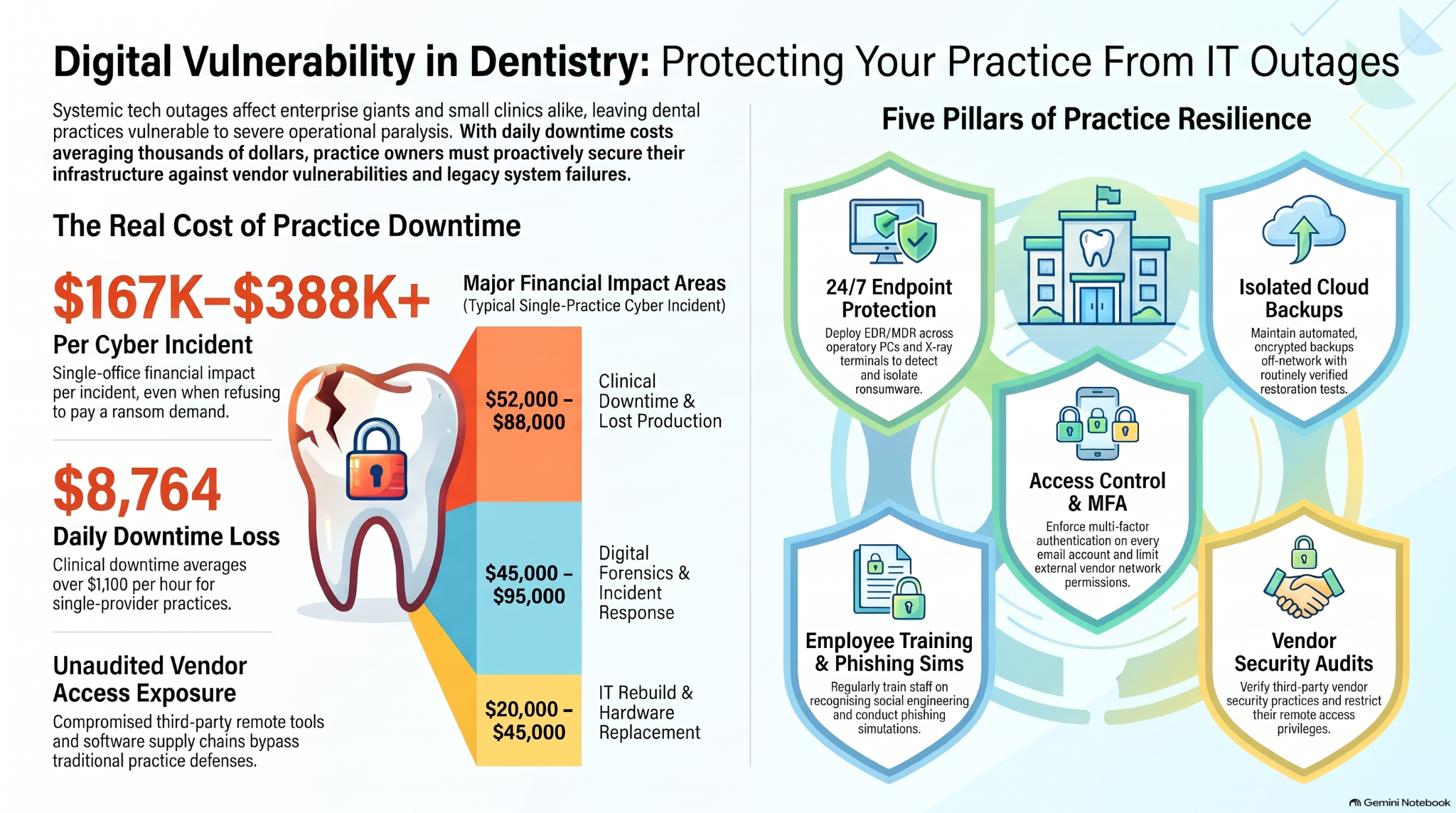
Supplied infographic: illustrative cost estimates and five resilience practices. Individual incident costs and service outcomes vary.
Why broad technology outages matter to a dental practice
A clinic depends on connected systems for scheduling, clinical records, digital imaging, communications, payments, and vendor support. An interruption can delay care and make routine work harder, even when the practice itself has not been directly targeted. Providers, network services, software updates, and shared remote-management tools can all affect availability.
The examples summarized in the supplied article span cloud productivity, aviation, payroll and HR, banking, airline operations, and healthcare. They illustrate that technology can fail for different reasons, including software defects, maintenance, equipment limitations, and security incidents. They do not show that every interruption is a cyberattack.
What downtime could mean for the practice
The supplied document gives an estimated $167,000 to $388,000 or more for a typical single-office cyber incident, and an estimated $8,764 in daily lost production during downtime. It describes a representative practice using roughly $2.2 million in annual revenue and about 5,000 charts. These are estimates in the source material, not a forecast for any particular practice. Costs depend on the incident, recovery duration, practice operations, contracts, insurance, and other circumstances.
When practice management or imaging is unavailable, the team may have to reschedule visits, use downtime procedures, restore access, and reconcile records afterward. Payroll and operating expenses continue during an interruption. Recovery time also depends on the systems affected and the vendors involved.
Five resilience pillars to review
1. Endpoint protection and monitoring
Identify how operatory computers, imaging terminals, servers, and user accounts are monitored. Agree who reviews alerts, how potential threats are contained, and how the practice will keep essential workstations available.
2. Isolated backups and recovery tests
Map which records and systems are backed up, where protected copies reside, who can restore them, and how often restoration is tested. A backup plan should account for access credentials and dependencies as well as the data itself.
3. Access controls and multi-factor authentication
Review staff and vendor permissions, especially remote access. Use multi-factor authentication where supported, limit accounts to the access needed for their role, and document how access is removed when a person or provider no longer needs it.
4. Staff readiness and phishing awareness
Give staff a clear way to report suspicious messages and unexpected system behavior. Practice how the front desk and clinical team will communicate when email, phones, or the scheduling system is disrupted.
5. Vendor security and continuity
List vendors with access to systems or sensitive information. Confirm points of contact, incident-notification steps, support coverage, and how remote access can be reviewed or disabled if necessary.
Start with the first hour
Write down who leads the response and who contacts the IT provider, software vendors, insurer, and other advisers. Identify which systems are essential to patient care and what safe downtime procedures the team should follow. Decide how appointment changes will be communicated and how paper or offline records will be reconciled later.
Ask when backups were last restored in a test, which vendors can connect remotely, whether multi-factor authentication is enabled for email and remote access, and who approves emergency changes. Keep the plan accessible if the network is unavailable, then review it with the people expected to use it.
Five questions to answer before the next outage
Who does the team call at 7:40 a.m.? What is the first system to restore? Can the practice continue essential work safely while systems are down? Which vendors have remote access, and who can review it? When did the team last test a recovery procedure? Assign an owner to each unanswered question and set a review date.
Plan your next step
Review technology dependencies and recovery priorities.
Hitec-med can discuss dental practice technology safeguards and operational support. Compliance determinations should involve qualified privacy and legal professionals.
Editorial note: This article summarizes the supplied source document. Its incident counts and financial ranges are period-specific estimates, not guarantees or forecasts. Verify current incident details and requirements with authoritative sources and qualified professionals.